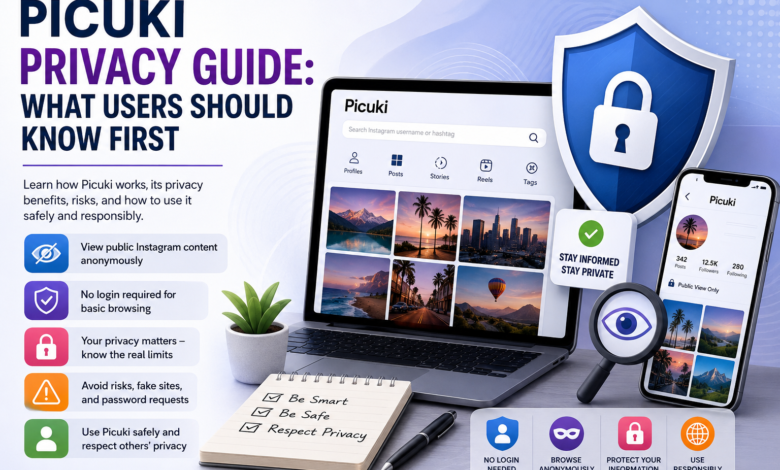
Picuki is often discussed as a simple way to view public Instagram content without signing in. Many people look for it because they want quick access to profiles, posts, stories, or media without opening the Instagram app. That sounds easy, but privacy should always come first.
A tool like this can feel useful when you only want to look at public content. Maybe you do not want to create an account, or maybe you want to check a public profile from a browser. Still, it is important to understand what this kind of tool can and cannot do.
The biggest point is simple: Picuki should never be seen as a magic privacy shield. It may reduce direct visibility in some cases, but it does not remove every digital trace. Websites can still collect basic browser data, and copycat pages may not follow safe practices.
This guide explains Picuki in a clear, practical way. You will learn how it works, what privacy benefits users often expect, where the limits are, and how to avoid common risks.
What Is Picuki?
Picuki is known as a third-party online viewer connected with public social media content, especially Instagram-style browsing. People often use it to view public profiles, posts, reels, stories, hashtags, or related media from a browser.
The main appeal is convenience. Instead of logging into an account, users may be able to enter a username or post link and view available public content. This makes it attractive for casual browsing, research, or checking public posts quickly.
Some versions of Picuki-style pages also mention media saving or editing features. These features may change over time because third-party tools often update, stop working, or move to different domains.
It is also important to know that Picuki is not the same as Instagram. It is not a direct replacement for the official app, and it should not be treated as a trusted place to enter private account details.
Why Privacy Matters Before You Use It
Privacy matters because third-party viewing tools sit between you and the content you want to see. Even when a page says it offers anonymous browsing, you still need to think about what the website itself can see.
For example, a website may receive your IP address, browser type, device details, rough location, and activity on that page. This does not always mean something harmful is happening, but it does mean your visit is not completely invisible.
Another concern is confusion. Many people assume “anonymous” means nobody can know anything. In real life, it usually means the Instagram profile owner may not see your personal Instagram account viewing their content.
That is not the same as full online privacy. Your internet provider, browser, network, or the website itself may still process basic data linked to your visit.
What Picuki Can Usually Show
Picuki-style tools usually focus on public content. This may include public profile pages, visible posts, captions, comments, profile pictures, hashtags, and sometimes stories or reels if the tool can access them.
This matters because public content is already open to a wider audience. If a creator, brand, or user has a public profile, their posts may be visible beyond their follower list. A viewer tool may simply make that public material easier to open in a browser.
However, public does not mean “free to use however you want.” A photo, video, caption, or design may still belong to the original creator. Viewing is one thing, but copying, reposting, or using someone else’s content without permission can create problems.
Picuki also may not work the same every day. Social platforms often change access rules, page layouts, and technical systems. Because of that, third-party viewers can break, show limited results, or display old information.
Privacy Benefits and Real Limits
The biggest privacy benefit people expect from Picuki is no-login viewing. If the tool works without asking for an Instagram username and password, that can reduce the risk of giving away account access.
Another benefit is simple separation. You may be able to view public content without opening your personal social account. For users who only want to check public information, this can feel cleaner and less distracting.
But the limits are just as important. Picuki cannot safely promise that you are invisible everywhere online. It also should not be expected to open private profiles, hidden stories, deleted posts, or content blocked by the account owner.
A healthy rule is this: use Picuki only for public information, and do not expect it to bypass privacy settings. If a private account has chosen to limit its audience, that boundary should be respected.
Safety Risks, Copycats, and Broken Pages
One common risk is fake or copycat websites. Because Picuki is a popular name, other pages may use similar branding to attract clicks. Some may be harmless, but others may show aggressive ads, redirects, pop-ups, or suspicious download buttons.
Another risk is account theft. A safe public viewer should not need your Instagram password. If a page asks you to log in with your social account to unlock private content, that is a major warning sign.
Broken pages are also common with tools like this. If Picuki is not working, it may be due to platform changes, server issues, domain changes, blocked access, or outdated features. This does not always mean your device has a problem.
Users should also be careful with downloads. Saving media from public pages can be useful for personal reference, but downloaded files should be handled wisely. Do not open unknown files, install random apps, or click extra buttons that are not needed.
How to Use Picuki More Safely
The safest way to use Picuki is to treat it as a basic public viewer, not as a private access tool. Keep your expectations simple, and avoid any page that promises too much.
Never enter passwords, recovery codes, payment details, or personal messages into a viewer page. Picuki should not need that information to show public content. A request for sensitive details is a strong reason to leave the page.
Use these simple checks before trusting any Picuki-style page:
- Avoid pages that ask for your Instagram password.
- Do not download unknown browser extensions.
- Close sites with repeated pop-ups or forced redirects.
- Respect private profiles and creator ownership.
It is also smart to use a modern browser, keep security settings on, and clear site data if a page feels suspicious. These steps do not make browsing perfect, but they reduce common risks.
Final Thoughts
Picuki can be useful for people who want a quick way to view public Instagram-style content without signing in. Its appeal is simple: fast access, less friction, and a more private feeling than using a personal account.
Still, privacy has limits. No third-party website can promise total invisibility, and no public viewer should be used to cross private boundaries. The safest approach is to view only public content and avoid sharing any sensitive information.
Think of Picuki as a convenience tool, not a security tool. When used carefully, it may help with simple browsing. When used carelessly, especially through fake pages or password requests, it can create avoidable risk.
Frequently Asked Questions (FAQs)
What is Picuki used for?
Picuki is commonly used to view public Instagram-style content from a web browser. People may use it to check public profiles, posts, stories, hashtags, or media without logging into a personal account.
Is Picuki private to use?
Picuki may offer a more private browsing experience because it may not require an Instagram login. However, the website itself may still process basic visit data, so users should not treat it as fully invisible browsing.
Can Picuki view private Instagram accounts?
Picuki should not be expected to open private accounts or hidden content. If an account is private, only approved followers should be able to see its protected posts through normal platform rules.
Is it safe to enter my password on Picuki?
No, you should not enter your Instagram password on Picuki or any similar viewer page. A public viewer should not need your login details, and password requests can be a sign of a risky or fake page.
Why is Picuki not working sometimes?
Picuki may stop working because social platforms change their systems, block outside access, or update how public content loads. Server problems, domain changes, or fake mirror sites can also cause confusion.
What should I do before using Picuki?
Use it only for public content, avoid suspicious downloads, and never share sensitive details. Also check that the page looks clean and does not force pop-ups, extensions, or login requests.
Read More: Willowmagazine.co.uk